Welcome
 Automate
 Ensure
 Analyze
 Other
Other Download
Security
Compliance Recording in 2026: a complete guide


 Download

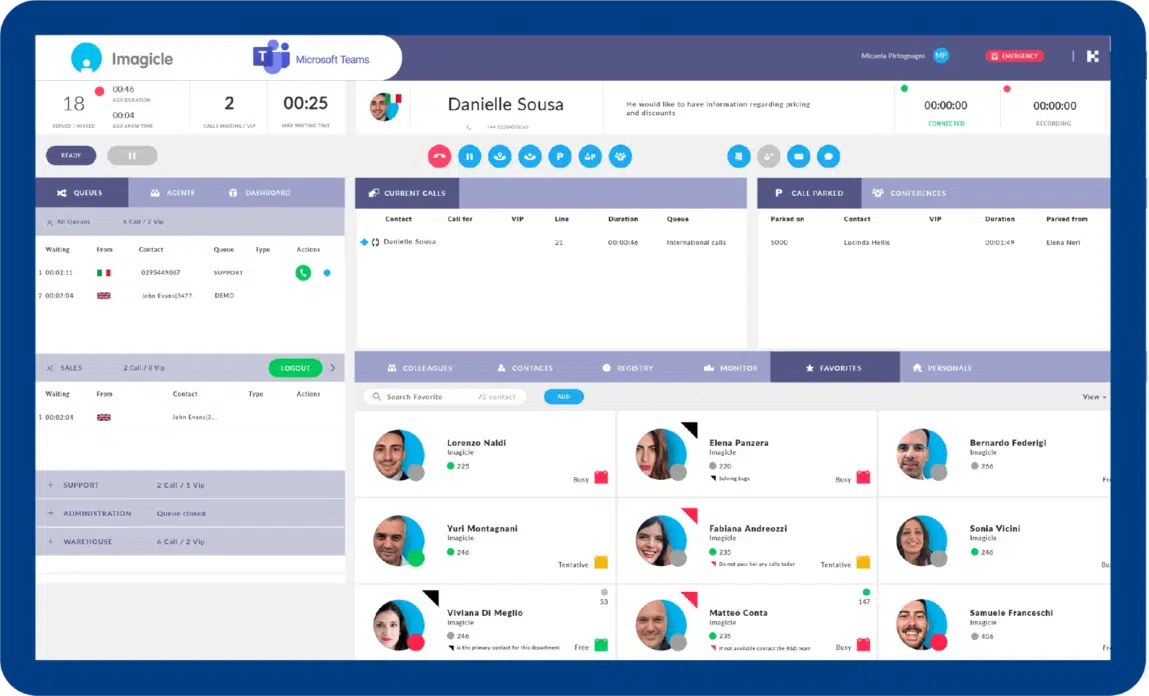
Attendant Console is based on Microsoft Azure Communication Service (ACS), meaning easier deployment and configuration and higher reactivity and stability.
Attendant Console is recognized as a Contact center solutions certified for Microsoft Teams, proving Imagicle meets Microsoft's rigorous standards.
Answering, transferring and parking, camp-on to fully manage calls in the easiest and smartest way possible from a single interface.
Leverage Advanced Queueing and Auto Attendant for queue and IVR management, and Contact Manager to find and call any contact, in any directory, in seconds.
Thanks to the automatic users synch from Entra AD, your updated list of colleagues is displayed in a blink of an eye directly from your Attendant Console.
Supports hybrid and smart working models, with special features for visually impaired users if needed.
Attendant Console is based on Microsoft Azure Communication Service (ACS), meaning easier deployment and configuration and higher reactivity and stability.
Attendant Console is recognized as a Contact center solutions certified for Microsoft Teams, proving Imagicle meets Microsoft's rigorous standards.
Answering, transferring and parking, camp-on to fully manage calls in the easiest and smartest way possible from a single interface.
Leverage Advanced Queueing and Auto Attendant for queue and IVR management, and Contact Manager to find and call any contact, in any directory, in seconds.
Thanks to the automatic users synch from Entra AD, your updated list of colleagues is displayed in a blink of an eye directly from your Attendant Console.
Supports hybrid and smart working models, with special features for visually impaired users if needed.
 Download
Download
Download
Download
Download
 Discover
Download
Discover
Discover
Download
Discover
 Watch
Watch
Watch
Watch
Watch
Watch
Download
Download
Download
Download
Watch
Watch
Watch
Watch
Watch
Watch
Download
Download
Download
Download
Yes. Imagicle provides robust call queuing and routing intelligence for Microsoft Teams via its Attendant Console with Advanced Queueing and Auto Attendant. Capabilities include multiple distribution algorithms (sequential, priority, idle-time, round-robin, broadcast, and on-demand/cherry-pick), prioritization at queue and caller level, caller language–based routing, agent login/logout and wrap-up, and hours/holiday scheduling – plus queue analytics to reduce wait times and route to the best available operator.
Yes. Imagicle delivers personalized IVR in two ways, both integrated through Advanced Queueing in the Attendant Console for Teams:
The Imagicle Attendant Console is certified by VisionDept and includes features designed for visually impaired or blind operators:
Yes, with the help of other Imagicle products you get a unified interface with call controls and automation at your fingertips:
These two solutions integrate with the console and Teams giving life to an ecosystem with a unified and modern user experience.
Imagicle AI Virtual Receptionist, 100% integrated with both Imagicle Attendant Console and Microsoft Teams, provides an automated appointment booking feature, including:
This feature is granted leveraging Cal.com, an API first leading scheduling software for individuals and businesses. The caller asks for the person or department they need to book with and Virtual Receptionist identifies mutually available slots, granting 24/7 service and removing this repetitive task from receptionists’ workdays.
To enable the Imagicle Attendant Console for Microsoft Teams, you need an Imagicle license on top of your Microsoft Phone System license for the operators. The Imagicle Attendant Console is licensed by user (minimum 3 users), and it includes Advanced Queueing (bundled with 2 channels per console, expandable as needed). Auto Attendant/Advanced Queueing channels are shared and can scale for higher volumes. For pricing information, head over to the Microsoft Marketplace.
Yes. The architecture is PSTN-agnostic, working with Direct Routing (SBC), Operator Connect, or Microsoft Calling Plans.
The Imagicle Attendant Console leverages Azure Communication Services (ACS) SDK for native call control, so the console can function as a full softphone device with no need to run the MS-Teams client on the same PC.
It optionally allows to control selected SIP desk phones via an embedded Imagicle CTI server, letting the console act as a phone bar.
Client apps connect only to the UCX Suite server over a proprietary, encrypted TLS 1.2 session. An Imagicle Public SBC in Imagicle Cloud allows OTT-based secure SIP routing toward Microsoft Teams Cloud for environment separation and security. Operators assigned to Imagicle queues must have M365 E3 + Teams Phone Standard or M365 E5 (includes Phone Standard) and be Enterprise Voice–enabled.
A blind transfer (aka cold/direct transfer) sends the caller straight to the destination without speaking to the recipient first. First respondent’s line disconnects immediately and the caller hears ringing at the target. It’s fastest, but you can’t verify availability or context. It’s best used for known hotlines, queues, or when the destination is expected to always answer.
A consultative transfer (aka warm/supervised transfer) lets you speak with the recipient before connecting the caller. The caller is placed on hold while you confirm availability, share context, or leave notes; then you complete the transfer or return to the caller if the target can’t take it. It’s safer for VIPs, escalations, or complex inquiries.
Imagicle Attendant Console supports both transfers – and also a unique park-assisted transfer feature called Camp-on, with automatic return to operator upon target unavailability after a configurable time-out.
Yes. Operators can keep personal speed dials and Favorites and even move/copy Favorites between users, which is handy for standardizing operator layouts. You can also work with shared/company directories via Imagicle Contact Manager, so teams share the same contact lists (VIPs, departments, external partners) alongside personal entries. The console’s unified UI exposes Colleagues, Contacts, and Favorites tabs/panels (detachable/resizable), and the Fast Search hotkey searches across all of them, making custom panels practical for each team’s workflow.
Yes. Imagicle supports policy-based compliance recording for Teams: when an admin assigns a Teams compliance recording policy to the operator, a certified recording bot (Imagicle) is auto-invited to the user’s calls/meetings and captures media without user action. For scenarios that allow it, Imagicle also offers on-demand controls (start/stop/pause/resume), so operators can record selectively in addition to always-on policies. Pause/resume can be enforced centrally via the Imagicle platform’s recording APIs/policies, supporting regulated workflows. Practically, this means your attendant console users can operate under automatic, admin-driven compliance capture and (where your policy permits) use user-initiated controls exposed within MS-Teams certified App.
Yes. The console displays Microsoft 365 presence (Available/Busy/DND/etc.) and can show calendar information so operators know if a colleague is in a meeting, free or soon free, or out of office. Admin policy and permissions determine whose presence/calendar is visible.
Yes. The Fast/Fly Search lets operators query across Colleagues, Contacts, and Favorites from one field/hotkey, searching all contact fields (not just names). The Contact Manager that powers the console supports both a Google-like simple search and an Advanced Search with field filters (e.g., department, phone, email) directly inside the UCX Attendant Console. You can add custom fields/attributes and choose which of them appear in the console’s Internal “Colleagues” and External “Contacts” panels, so teams can filter or scan by bespoke labels (e.g., language, product line, VIP). And for external directories, you can bulk-load or update contacts via CSV/Excel import, keeping unified search current across people and sources.
Yes. In addition to your tenant directory, typically provisioned from Entra ID, you can surface external contacts from CRM/ERP sources (via Imagicle Contact Manager connectors or imports), ODBC-based database, other LDAP guest entries, and bulk CSV/phonebook uploads. This way, operators see one consolidated, searchable list.
Imagicle UCX Attendant Console does not leverage native MS-Teams Auto attendants and call queues, because Imagicle wants to provide administrators and supervisors the required tools to monitor each inbound call from cradle to grave, with own real-time Dashboard and historical reports. Thanks to these tools, a team supervisor can analyze the volume of calls hitting each queue, with average/max waiting times, percentage of served/lost calls and operators work load. Moreover, operator-related reports allows to dig deep into each agent’s performance and react accordingly in real-time.
Yes. Operators can log in/out of single and all queues, monitor waiting callers and wait time, and act based on priority; supervisors get a real-time Dashboard for queues and agent KPIs.
Yes. Historical reporting comes from Imagicle Advanced Queueing reports, which store a CDR for each queued call (arrival time, caller, queue, waiting time, conversation time, served destination/agent, and outcome/classification). You can run queue and agent-level reports to analyze volumes, service levels, abandoned/missed calls, handle time, and trends over any time range. There are also REST APIs to extract both historical and real-time stats (served/abandoned counts, average waiting/answering/duration, longest wait, agents logged-in/on-call, overflow counts) for BI dashboards. For day-to-day operations, supervisors use the console’s real-time Dashboard, while scheduled/historical reports live in the UCX Platform web portal. If you also deploy Call Analytics, you get an additional 60+ predefined traffic reports and dashboards across all users in your MS Tenant.