Welcome
 Automate
 Ensure
 Analyze
 Other
Other Download
Security
Compliance Recording in 2026: a complete guide


 Download

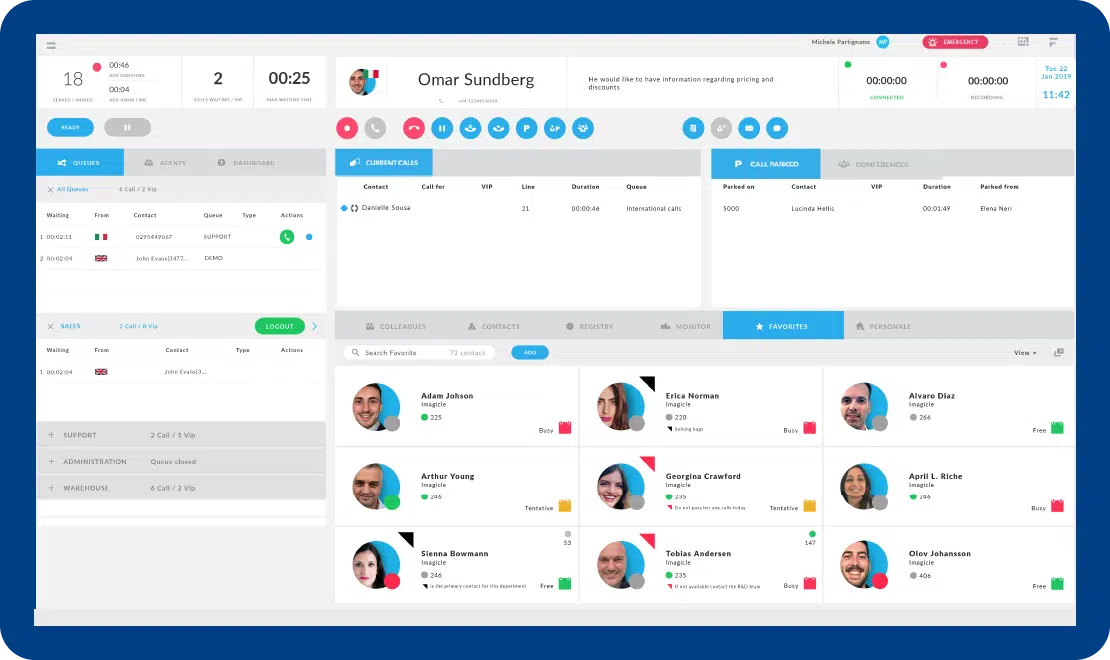
Answering, transfering and parking, queue management, and call recording.
Colleagues, contacts, favorites, active calls panel and much more.
All contacts available within seconds, wherever they are stored.
Compatible with assistive tools for visually impaired and blind users.
Same user experience on all devices, in the office and remotely.
Perfectly integrated with the other Imagicle solutions for Customer Service.
Answering, transfering and parking, queue management, and call recording.
Colleagues, contacts, favorites, active calls panel and much more.
All contacts available within seconds, wherever they are stored.
Compatible with assistive tools for visually impaired and blind users.
Same user experience on all devices, in the office and remotely.
Perfectly integrated with the other Imagicle solutions for Customer Service.

Design your answer menu and define behaviours and settings. Managing automatic call answering has never been easier.
Learn More
Improve incoming call management, optimize resources, reduce customer waiting time and welcome your customers at best.
Learn More
Boost call efficiency with Imagicle AI Virtual Receptionist – it transfers calls, answers FAQs, and schedules appointments effortlessly. Try it now!
Learn More
 Download
Download
Download
What calling platforms is Attendant Console compatible with?
Platforms listed in the following table have been verified for operation with the product. Imagicle solutions are based on technological standards and therefore operate with many of the most commonly used systems on the market. Should your system not be listed, please contact our technical department to check interoperability. Cloud Connector, Office365 and Teams are currently not supported.
| Producer | System | Release | Certifications | Notes |
|---|---|---|---|---|
| Avaya-Nortel | IP Office | 8.x- 9.x- 10.x- 11.x | Desktop CTI only- for blind and short-sighted operators- without Advanced Queueing support | |
| BroadSoft | BroadWorks | R22.0 and above | BroadSoft Compatible | supports Cisco IP Phones- Webex Desktop client and Broadsoft UC One softphone for operators |
| CISCO | HCS | 8.6- 9.x- 10.x- 11.x-12.x-14.x | supports Cisco IP Phones- Webex Desktop and Jabber Desktop clients for operators | |
| CISCO | Unified Communications Manager (Included Webex Calling Dedicated) | 8.6- 9.x- 10.x- 11.x- 12.x-14.x | Cisco Compatible | supports Cisco IP Phones- Webex Desktop and Jabber Desktop clients for operators |
| CISCO | Unified Communications Manager Business Edition 6000 | 8.6- 9.x- 10.x- 11.x-12.x-14.x | Cisco Compatible | supports Cisco IP Phones- Webex Desktop and Jabber Desktop clients for operators |
| CISCO | Unified Communications Manager Business Edition 7000 | 8.6- 9.x- 10.x- 11.x-12.x-14.x | Cisco Compatible | supports Cisco IP Phones- Webex Desktop and Jabber Desktop clients for operators |
| CISCO | Webex Calling Multi-Tenant | supports Cisco MPP Phones and Webex Desktop client for operators | ||
| Microsoft | Skype for Business Server 2015/2019 | Operator/Agent leverages standard S4B client and Attendant Console on the same PC. | ||
| Microsoft | Microsoft Teams | ACS-Based UCX Attendant Console, including softphone features. |
What endpoints is Attendant Console compatible with?
| Product | Producer | Phone | Certifications | Notes |
|---|---|---|---|---|
| Attendant Console | CISCO | 6900 series | ||
| Attendant Console | CISCO | 7800 series | ||
| Attendant Console | CISCO | 7900 series | ||
| Attendant Console | CISCO | 8800 series | ||
| Attendant Console | CISCO | 8900 series | ||
| Attendant Console | CISCO | 9900 series | ||
| Attendant Console | CISCO | IP Communicator | ||
| Attendant Console | CISCO | Webex Desktop and Jabber Desktop clients | ||
| Attendant Console | MICROSOFT | ACS-Based UCX Attendant Console, including softphone features. |
Download
 Discover
Download
Discover
Discover
Download
Discover
 Watch
Watch
Watch
Watch
Watch
Watch
Download
Download
Watch
Watch
Watch
Watch
Watch
Watch
Download
Download
The Attendant Console natively includes Silent Monitoring (listen to an agent’s live call without them knowing) and Whisper Coaching (supervisor gives live guidance to the agent during the call)*. When paired with the Imagicle Advanced Queueing application, includes supervisor-oriented panels: a dashboard for real-time monitoring of agents, queues, waiting times and handled/missed calls which can also be used as a wallboard.
*These features are not available for Microsoft Teams.
Yes. When paired with the Imagicle Contact Manager application, it integrates with directories (Exchange, Outlook, Salesforce and other LDAP/AD directories) so that all contacts (corporate and personal) are available within seconds. It also supports click-to-call functionality from the directory panel.
The Attendant Console is certified for use by visually impaired or blind users, compatible with assistive tools such as ZoomText Magnifier, Braille displays and Vocalizer software. This ensures it’s fully accessible and inclusive for all operators, in-office or remotely.
The console supports major enterprise calling platforms (on-premises and cloud) such as Cisco UCM, Webex Calling, Microsoft Teams, and general SIP/UCX-based systems. It manages CTI control, BLF (Busy Lamp Field) statuses, colleagues’ presence, calendar integration and more. For more information, visit the Attendant Console Tech Specs.
No, the Attendant Console requires the Advanced Queueing software to receive calls and integration with a calling platform to enable telephony. Upon purchasing, you will be given 2 Advanced Queueing channels (which you can later scale). And for complete customer service, you can add Auto Attendant and Contact Manager.
If the Attendant Console fails to log in, common issues include invalid credentials, CTI server unreachable, incorrect extension mapping in UCX Suite, network/firewall issues blocking CTI communication, or unsupported certificate/authentication method (especially with SSO or self-signed certificates). The knowledge base provides a full troubleshooting guide under Troubleshooting guide “Attendant Console Login Failed”.
Yes. Administrators can deploy the console in “silent mode” (without user intervention) using standard deployment tools. This supports large-scale roll-out to operator PCs without manual input. The knowledge base provides a more complete answer under How to let a system admin deploy the Attendant Console in silent mode, without user intervention.
The call park feature lets operators park a live call on a park slot and retrieve it later from the call parked tab. It relies on the call park feature of the PBX, so you must first configure a range of call park numbers on it, enable CTI call park monitoring for the CTI user, and then enable the call parked panel in the Imagicle Attendant Console. If parking or retrieving fails, test call park directly from the phone, verify that park numbers and CTI permissions are correctly configured on the PBX, and then restart CTI/TSP services if needed.
Imagicle Attendant Console offers several keyboard shortcuts to speed up daily activity. The most important is the Fast Search hot-key (by default CTRL+2), which opens a search window where operators can type a name or number and instantly search across colleagues, favourites and directory contacts, then call or transfer with one click. Additional hot-keys can be configured for actions like answer, hold, transfer, park and queue login/logout, and are fully customisable from Tools → Options → HotKeys in the client.
Design your answer menu and define behaviours and settings. Managing automatic call answering has never been easier.
Learn More
Improve incoming call management, optimize resources, reduce customer waiting time and welcome your customers at best.
Learn More
Boost call efficiency with Imagicle AI Virtual Receptionist – it transfers calls, answers FAQs, and schedules appointments effortlessly. Try it now!
Learn More