Welcome
 Automate
 Ensure
 Analyze
 Other
Other
Imagicle for Microsoft Teams Webinar Series.


 Download

6 languages to welcome and connect your customers to the right person. Shorter waiting times, happier customers.
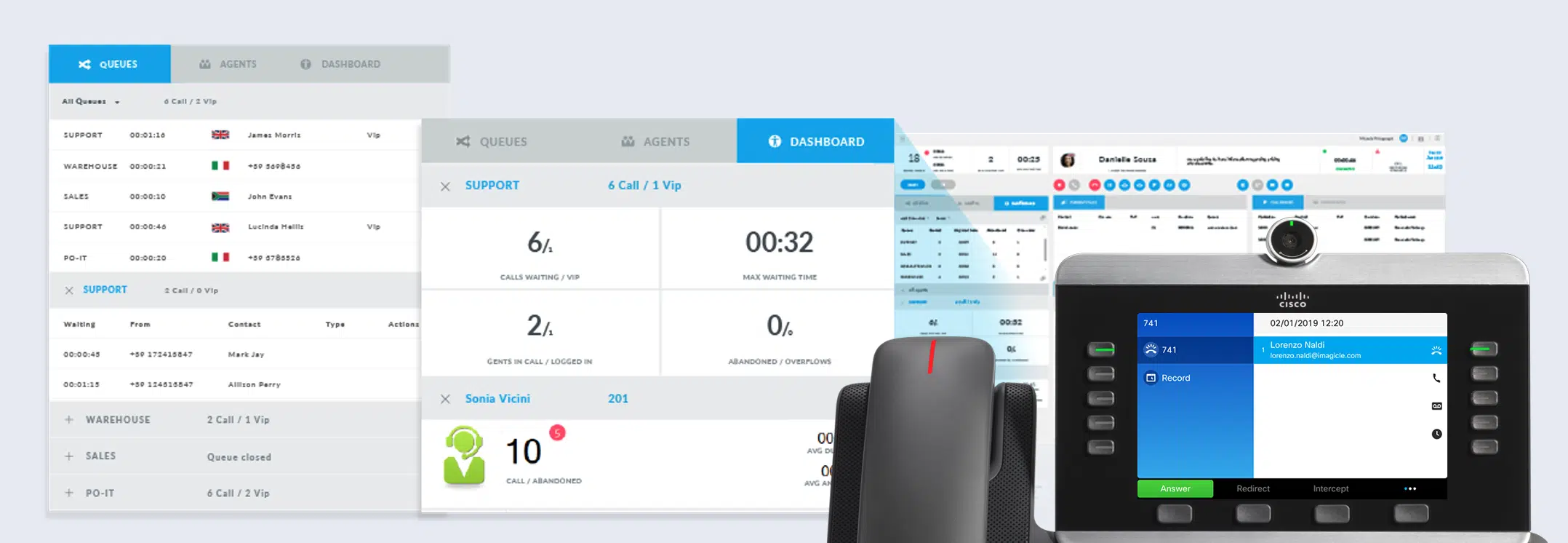
Flexible and powerful queue configuration leveraging several distribution algorithms, providing a fast, reliable service 24/7.
An automatic message informs the caller of their place in the queue upon calling, setting the right waiting expectations.
Designed to work flawlessly with Imagicle Attendant Console and Auto Attendant for a complete, rich, easy-to-use solution.
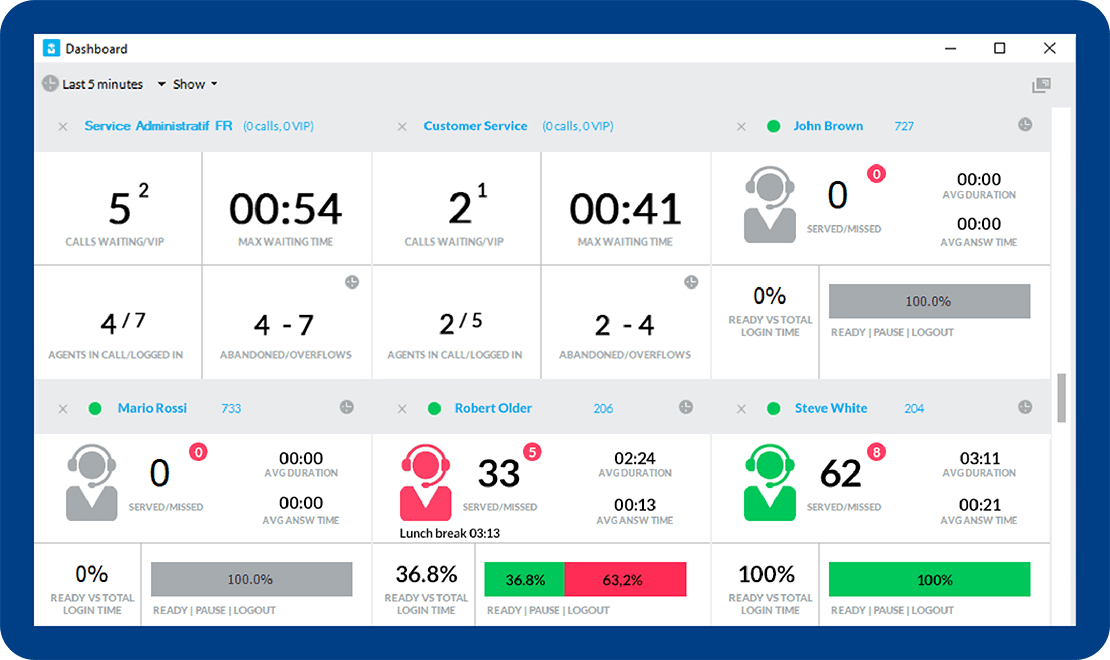
Advanced user profiling, easy queue login/logout, wrap-up interval for all agents, queues set up and intervention.
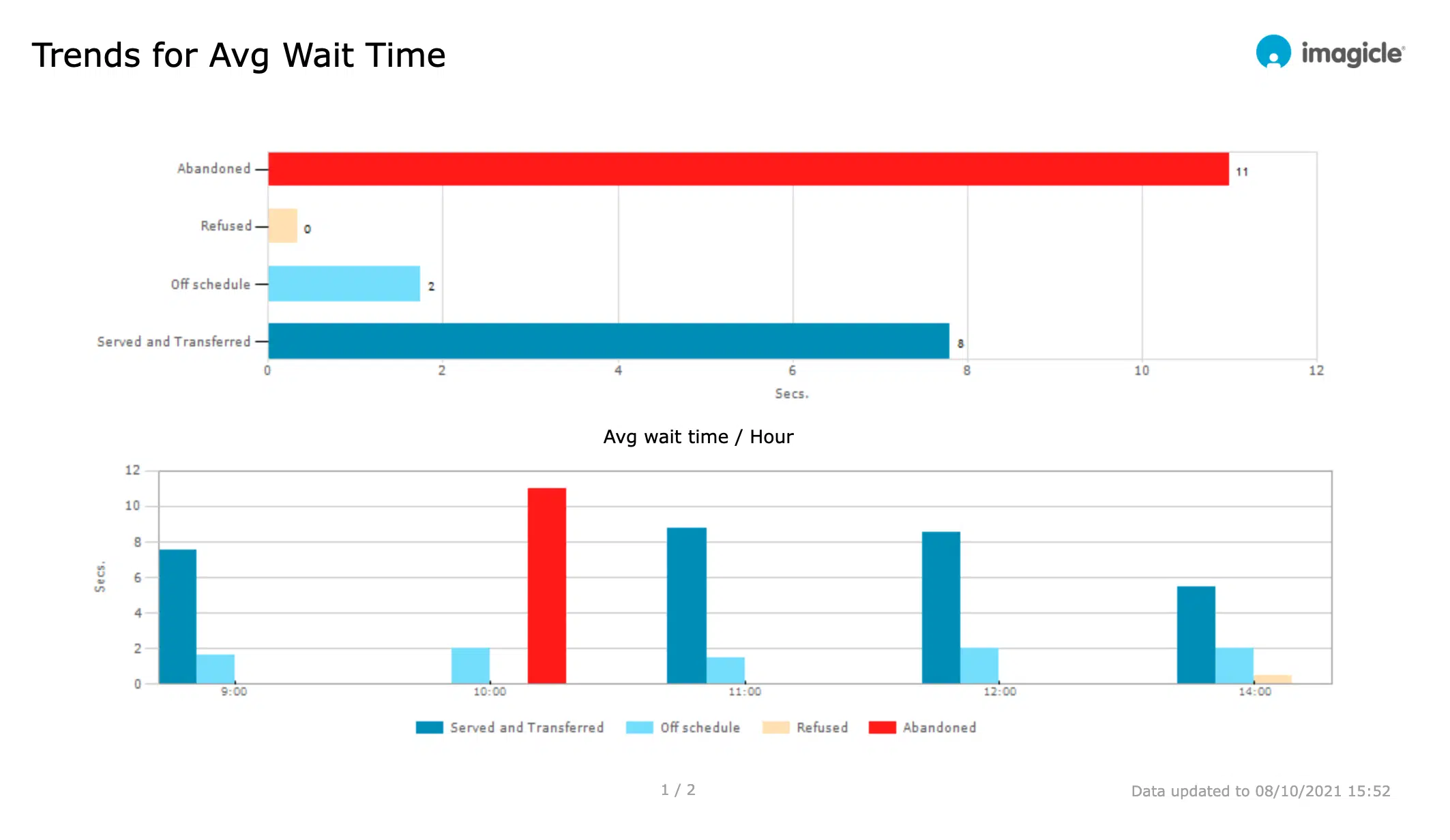
Collect crucial info with a range of reports detailing call traffic patterns to improve performance and customer satisfaction.
6 languages to welcome and connect your customers to the right person. Shorter waiting times, happier customers.
Flexible and powerful queue configuration leveraging several distribution algorithms, providing a fast, reliable service 24/7.
An automatic message informs the caller of their place in the queue upon calling, setting the right waiting expectations.
Designed to work flawlessly with Imagicle Attendant Console and Auto Attendant for a complete, rich, easy-to-use solution.
Advanced user profiling, easy queue login/logout, wrap-up interval for all agents, queues set up and intervention.
Collect crucial info with a range of reports detailing call traffic patterns to improve performance and customer satisfaction.

Manage your calls quickly and professionally: transfer, park, notify calls on hold and check your colleagues' status.
Learn More
Design your answer menu and define behaviours and settings. Managing automatic call answering has never been easier.
Learn More
Synchronize your contacts among multiple directories. Enable click to call and welcome your customers by name with the Caller ID.
Learn More
 Download
Download
Download
What calling platforms is Advanced Queueing compatible with?
Platforms listed in the following table have been verified for operation with the product. Imagicle solutions are based on technological standards and therefore operate with many of the most commonly used systems on the market. Should your system not be listed, please contact our technical department to check interoperability. Cloud Connector, Office365 and Teams are currently not supported.
| Producer | System | Release | Certifications | Notes |
|---|---|---|---|---|
| Alcatel - Lucent | OmniPCX Enterprise | 9.x-10.x | Requires as many Alcatel SIP Trunk licenses as the number of proposed Advanced Queuing channels | |
| Avaya-Nortel | Communication Manager - Aura | 6.x-7.x-8.x | Requires as many Avaya SIP Trunk licenses as the number of proposed Advanced Queuing channels | |
| BroadSoft | BroadWorks | R22.0 and above | BroadSoft Compatible | CTI Monitoring through XSI APIs |
| CISCO | HCS | 8.6- 9.x- 10.x- 11.x-12.x-14.x | ||
| CISCO | Unified Communications Manager (Included Webex Calling Dedicated) | 8.6- 9.x- 10.x- 11.x- 12.x-14.x | Cisco Compatible | |
| CISCO | Unified Communications Manager Business Edition 6000 | 8.6- 9.x- 10.x- 11.x-12.x-14.x | Cisco Compatible | |
| CISCO | Unified Communications Manager Business Edition 7000 | 8.6- 9.x- 10.x- 11.x-12.x-14.x | Cisco Compatible | |
| CISCO | Unified Communications Manager Express | 7.x- 8.x- 9.x-10.x-11.x-12.x-14.x | As CTI Monitoring is not available- the following algorithms cannot be used: Priority and Idle Time. The conversation time (maximum and average time included) will be zero on the following reports: Call Volume- Time Analysis- Call Details- Agent analysis | |
| CISCO | Webex Calling Multi-Tenant | Native integration | ||
| Microsoft | Microsoft Teams - Skype for Business Server 2015/2019 | Native integration | ||
| Mitel-Aastra-Ericsson | MiVoice Business | 8.0.1.25 | Imagicle CTI licenses required. | |
| MaticMind | MonkeyVoice | 2 | Imagicle CTI licenses required. |
Download
Download
 Watch
Watch
Watch
Watch
Watch
Watch
Download
Download
Download
Download
Watch
Watch
Watch
Watch
Watch
Watch
Download
Download
Download
Download
Advanced Queueing is a call-queue management solution that enables organisations to define multiple waiting queues for incoming calls, apply time-based behaviours (business hours, holidays), hold callers with music or prompts (if paired with Auto Attendant), and dispatch calls efficiently to available agents. It’s important for customer service because it helps reduce wait times, improve caller experience, optimise agent utilisation, and clearly monitor service quality – all key for demand generation and retention.
The solution uses configurable distribution algorithms (e.g., Idle Time, Round Robin, Priority, Sequential) to dispatch queued calls to available agents. Administrators assign agents to escalation levels and select the algorithm matching their call-flow. If one agent is unavailable, the system escalates to the next level.
Yes, you can enable queue position announcements, so callers hear messages like “You are number 3 in line” or “There are more than 9 calls waiting” while on hold. Administrators configure this under Voice Messages tab and tie it to wait-time or position thresholds.
Advanced Queueing offers built-in statistical reports in the web portal under Reports: you can view queue analytics (call volumes per queue, average wait times, maximum wait times, number of abandoned calls, termination reasons), agent performance (calls per agent, wrap-up times, login/logout status), and schedule these reports to be automatically generated and emailed.
Filters include date range, queue, agent/extension, call classification and termination cause. Export formats include PDF, Excel/CSV.
Advanced Queueing works with major enterprise calling platforms (on-premises or cloud) that support SIP trunks and CTI/TAPI monitoring. While only Imagicle users can be “agents”, the system can route calls to external numbers or non-CTI monitored phones, though some algorithms perform best when endpoints are CTI-monitored.
Yes. The solution supports 24/7 operation via weekly schedules and holiday tables; you can define time-based behaviours (open/closed times, overflow routing) for every queue. It also provides voice prompts in multiple built-in languages (at least 6 languages) and allows upload of custom audio in WAV/MP3 for greetings, wait messages and announcements.
However, Advanced Queueing on its own still depends on human agents being logged in to answer calls. For a truly always-on, 24/7 customer service (nights, weekends, peak seasons, etc) customers should combine queues with Imagicle AI solutions (AI Virtual Receptionist, Digital Virtual Agents & Voice Virtual Agents), which provide conversational self-service 24/7 and escalate to human agents only when needed.
It integrates deeply: while it can work standalone for basic queuing, the full power emerges when paired with modules like Attendant Console (for operator interfaces), Auto Attendant (for IVR menus), AI Virtual Receptionist (for 24/7 first-level service).
Yes, you can define a list of calling numbers that will be treated as VIPs and will skip the regular queue waiting, jumping ahead of other callers. This requires a Contact Manager licence and advanced configuration performed by the Imagicle support.
If an incoming call arrives and the pilot number is not associated with any queue or Auto Attendant service, Imagicle Advanced Queueing will play a voice prompt indicating that the “called number is not associated to any valid service” and then hang up or apply the defined fallback treatment.
In the web portal, go to Advanced Queueing → Default Settings. Here you can define values that apply to all queues (unless overridden): login/logout toggle number, retention period for CDRs, maximum waiting time, behaviours for overflow/no agents, time tables, voice messages, and call-distribution tuning (e.g., wrap-up time, sticky agent). When a queue is created it inherits these settings by default, and you can choose to override specific parameters for that queue.
In a queue’s settings (or default settings) under “Behaviours Tuning”, you can set a Maximum Waiting Time (e.g., 300 seconds). Then define an overflow treatment: after this wait time expires, play a message and transfer the caller to a voicemail number (or hang up). That way, callers are not left waiting forever.
However, voicemail is still a dead-end experience and requires agents to call back later. For a smarter overflow, companies can route those long-wait callers to AI solutions (AI Virtual Receptionist, Digital Virtual Agents & Voice Virtual Agents), which provide 24/7 self-service, collect intents and key info, and only escalate to human agents when necessary – improving customer experience and keeping the queue under control.
Manage your calls quickly and professionally: transfer, park, notify calls on hold and check your colleagues' status.
Learn More
Design your answer menu and define behaviours and settings. Managing automatic call answering has never been easier.
Learn More
Synchronize your contacts among multiple directories. Enable click to call and welcome your customers by name with the Caller ID.
Learn More