










Advanced Queueing
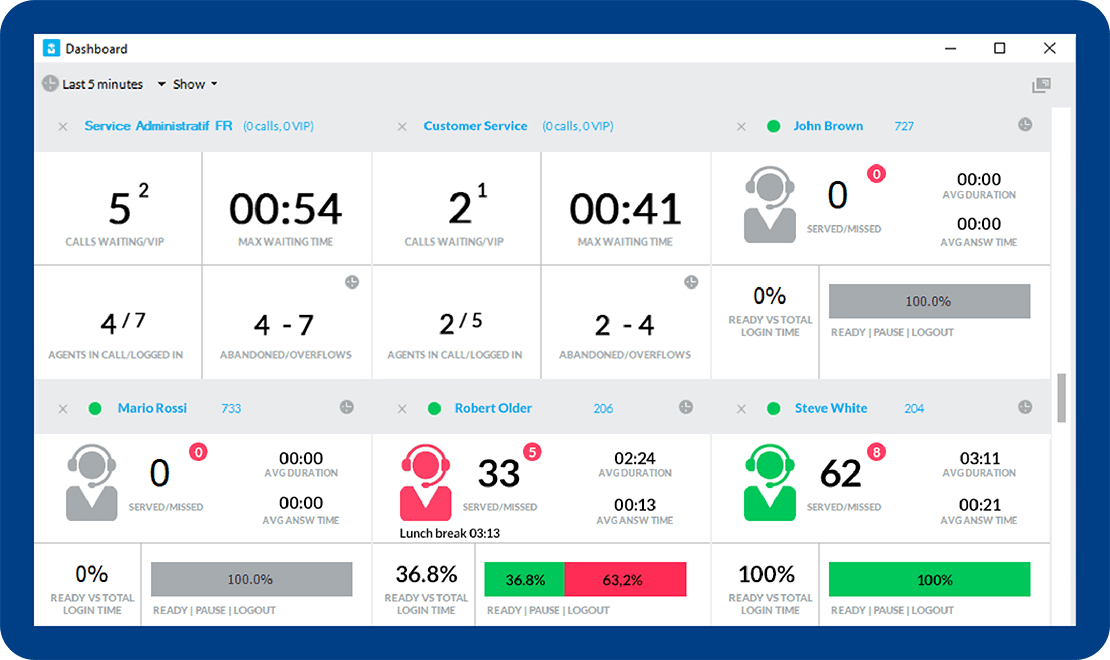
Imagicle Advanced Queueing is the solution to transfer calls to operators based on their availability, reducing customer waiting times and analyzing queues in detail.
The right boost for your welcoming services.
Customer satisfaction starts here.
6 languages for your IVR Contact Center to welcome and connect your customers to the right person. Shorter waiting times, happier customers.
Fast, smart, always on.
Flexible and powerful queue configuration leveraging several distribution algorithms, providing a fast, reliable service 24/7.
Let your customers know their position in the queue.
An automatic message informs the caller of their place in the queue upon calling, setting the right waiting expectations.
Simple integration. Exceptional Customer Service.
Designed to work flawlessly with Imagicle Attendant Console and Auto Attendant for a complete, rich, easy-to-use solution.
Dedicated functions for operators, supervisors and admins.
Advanced user profiling, easy queue login/logout, wrap-up interval for all agents, queues set up and intervention.
The data you need to drive real business outcomes.
Collect crucial info with a range of reports detailing call traffic patterns to improve performance and customer satisfaction. Useful in contact center software scenarios.
Customer satisfaction starts here.
6 languages for your IVR Contact Center to welcome and connect your customers to the right person. Shorter waiting times, happier customers.
Fast, smart, always on.
Flexible and powerful queue configuration leveraging several distribution algorithms, providing a fast, reliable service 24/7.
Let your customers know their position in the queue.
An automatic message informs the caller of their place in the queue upon calling, setting the right waiting expectations.
Simple integration. Exceptional Customer Service.
Designed to work flawlessly with Imagicle Attendant Console and Auto Attendant for a complete, rich, easy-to-use solution.
Dedicated functions for operators, supervisors and admins.
Advanced user profiling, easy queue login/logout, wrap-up interval for all agents, queues set up and intervention.
The data you need to drive real business outcomes.
Collect crucial info with a range of reports detailing call traffic patterns to improve performance and customer satisfaction. Useful in contact center software scenarios.
Integrated with the solutions you love.







Details that make the difference.
Customer Service as you want it.

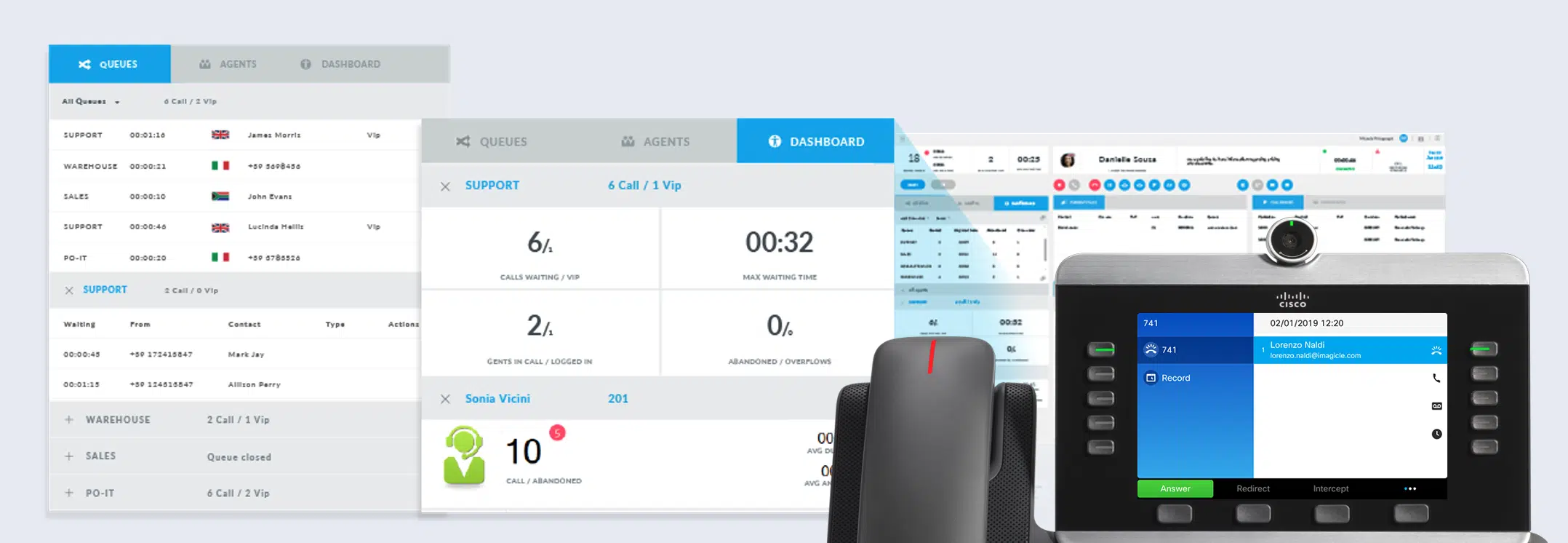


A comprehensive solution with the Imagicle apps.
A personalized welcome in your customers' language.
A profile for every need for a 100% customized service.
Wrap-up time, Camp-on, distribution algorithms.
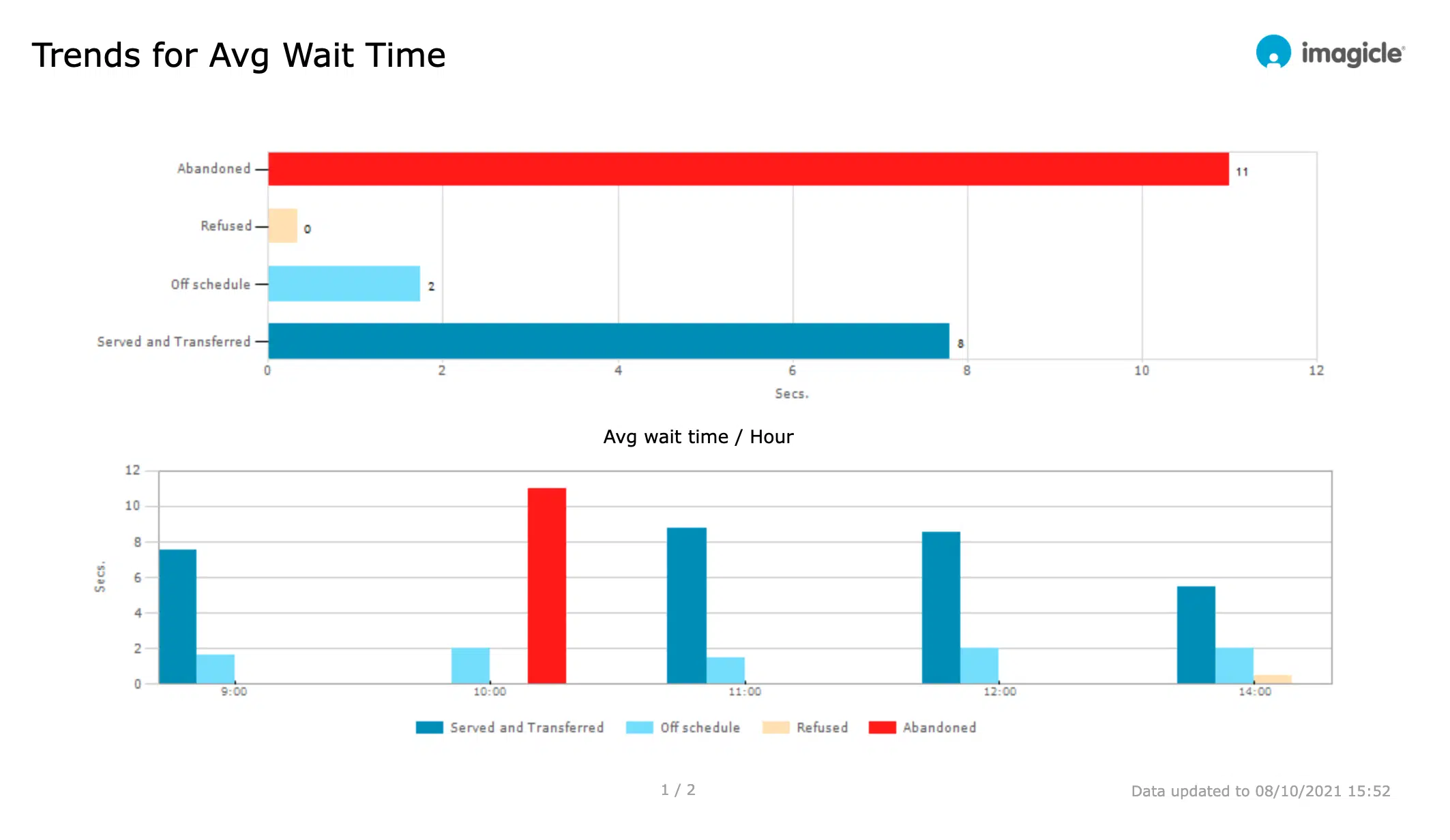
If you can measure it, you can improve it!



Get the most out of it.

Attendant Console
Manage your calls quickly and professionally: transfer, park, notify calls on hold and check your colleagues' status.
Learn More
Auto Attendant
Design your answer menu and define behaviours and settings. Managing automatic call answering has never been easier.
Learn More
Contact Manager
Synchronize your contacts among multiple directories. Enable click to call and welcome your customers by name with the Caller ID.
Learn More
Advanced Services

ImagicleCare
Resources.
-
Brochure Brochure
Imagicle Customer Service Product Brochure.
Imagicle Customer Service Product Brochure. -
Blog
Imagicle AI-powered CX and Contact Center series
Imagicle AI-powered CX and Contact Center series -
Products Blog
Communications Analytics in 2026: Why Reports Alone Aren’t Enough
Communications Analytics in 2026: Why Reports Alone Aren’t EnoughDiscover why traditional call reporting no longer keeps up with business decisions, and how the new Imagicle Advanced AI Analytics turns communication data into real-time insight.
Imagicle Customer Service Product Brochure.
Imagicle AI-powered CX and Contact Center series
Communications Analytics in 2026: Why Reports Alone Aren’t Enough
It's your turn! Try it!
Advanced Queueing Tech Specs.
Compatible calling platforms.
What calling platforms is Advanced Queueing compatible with?
Platforms listed in the following table have been verified for operation with the product. Imagicle solutions are based on technological standards and therefore operate with many of the most commonly used systems on the market. Should your system not be listed, please contact our technical department to check interoperability. Cloud Connector, Office365 and Teams are currently not supported.
| Producer | System | Release | Certifications | Notes |
|---|---|---|---|---|
| Alcatel - Lucent | OmniPCX Enterprise | 9.x-10.x | Requires as many Alcatel SIP Trunk licenses as the number of proposed Advanced Queuing channels | |
| Avaya-Nortel | Communication Manager - Aura | 6.x-7.x-8.x | Requires as many Avaya SIP Trunk licenses as the number of proposed Advanced Queuing channels | |
| BroadSoft | BroadWorks | R22.0 and above | BroadSoft Compatible | CTI Monitoring through XSI APIs |
| CISCO | HCS | 8.6- 9.x- 10.x- 11.x-12.x-14.x | ||
| CISCO | Unified Communications Manager (Included Webex Calling Dedicated) | 8.6- 9.x- 10.x- 11.x- 12.x-14.x | Cisco Compatible | |
| CISCO | Unified Communications Manager Business Edition 6000 | 8.6- 9.x- 10.x- 11.x-12.x-14.x | Cisco Compatible | |
| CISCO | Unified Communications Manager Business Edition 7000 | 8.6- 9.x- 10.x- 11.x-12.x-14.x | Cisco Compatible | |
| CISCO | Unified Communications Manager Express | 7.x- 8.x- 9.x-10.x-11.x-12.x-14.x | As CTI Monitoring is not available- the following algorithms cannot be used: Priority and Idle Time. The conversation time (maximum and average time included) will be zero on the following reports: Call Volume- Time Analysis- Call Details- Agent analysis | |
| CISCO | Webex Calling Multi-Tenant | Native integration | ||
| Microsoft | Microsoft Teams - Skype for Business Server 2015/2019 | Native integration | ||
| Mitel-Aastra-Ericsson | MiVoice Business | 8.0.1.25 | Imagicle CTI licenses required. | |
| MaticMind | MonkeyVoice | 2 | Imagicle CTI licenses required. |
Advanced Services
ImagicleCare
It's your turn! Try it!
From the Imagicle Beat blog.
-
Products Blog
Microsoft Teams Contact Center: 5 Reasons Why It Needs AI
Microsoft Teams Contact Center: 5 Reasons Why It Needs AIAI power is what your Microsoft Teams Contact Center needs to shine the brightest. Discover why in 5 actionable points. Happy reading! -
Products Blog
6 Contact Center Metrics That Matter in 2026
6 Contact Center Metrics That Matter in 2026Discover the contact center metrics that matter most in modern customer service, from sentiment analysis and real-time monitoring to AI-powered call summaries and keyword alerts. -
Products Blog
Communications Analytics in 2026: Why Reports Alone Aren’t Enough
Communications Analytics in 2026: Why Reports Alone Aren’t EnoughDiscover why traditional call reporting no longer keeps up with business decisions, and how the new Imagicle Advanced AI Analytics turns communication data into real-time insight.
Microsoft Teams Contact Center: 5 Reasons Why It Needs AI
6 Contact Center Metrics That Matter in 2026
Communications Analytics in 2026: Why Reports Alone Aren’t Enough
Dedicated webinars.
-
EN Wed. 9 Sep 11:30 AM CEST
 Register
WEBINAR - Sales Lab45’Contact Center Core: Simplify agents’ daily work. (EMEAR session)In this session, you'll discover Imagicle Contact Center Core: a brand-new, lightweight web client designed to bring customer context and agent workflows closer to where your team already works. Register now to secure your seat.
Register
WEBINAR - Sales Lab45’Contact Center Core: Simplify agents’ daily work. (EMEAR session)In this session, you'll discover Imagicle Contact Center Core: a brand-new, lightweight web client designed to bring customer context and agent workflows closer to where your team already works. Register now to secure your seat. -
EN Wed. 30 Sep 11:30 AM CESTRegister
WEBINAR - Sales Lab45’From Questions to Decisions. Advanced AI Analytics Live Deep Dive (EMEAR session)In this session, you'll discover how AI Advanced Analytics turns your communication data — across your Calling Platform (Webex, Teams, and Cisco UCM )— into decisions, with AI-generated dashboards and reports built automatically. See it in action and get your questions answered live. Register now to secure a seat.
Register
Register
Let's find out more!
-
Brochure Brochure
Imagicle Customer Service Product Brochure.
Imagicle Customer Service Product Brochure. -
Security Blog
Contact Center Compliance: The 2026 Guide
Contact Center Compliance: The 2026 GuideLearn how to ensure contact center compliance with call recording, speech analytics, and AI tools. Reduce risk and improve customer experience. -
Products Blog
5 Questions Your Communication Data Should Answer Instantly.
5 Questions Your Communication Data Should Answer Instantly.Discover the five questions your contact center data can already answer, and how to get answers the same day instead of days later.
Imagicle Customer Service Product Brochure.
Contact Center Compliance: The 2026 Guide
5 Questions Your Communication Data Should Answer Instantly.
We love answering your questions.
Advanced Queueing is a call-queue management solution that enables organisations to define multiple waiting queues for incoming calls, apply time-based behaviours (business hours, holidays), hold callers with music or prompts (if paired with Auto Attendant), and dispatch calls efficiently to available agents. It’s important for customer service because it helps reduce wait times, improve caller experience, optimise agent utilisation, and clearly monitor service quality – all key for demand generation and retention.
The solution uses configurable distribution algorithms (e.g., Idle Time, Round Robin, Priority, Sequential) to dispatch queued calls to available agents. Administrators assign agents to escalation levels and select the algorithm matching their call-flow. If one agent is unavailable, the system escalates to the next level.
Yes, you can enable queue position announcements, so callers hear messages like “You are number 3 in line” or “There are more than 9 calls waiting” while on hold. Administrators configure this under Voice Messages tab and tie it to wait-time or position thresholds.
- Wrap-up time: Administrators can set a “comfort interval” (in seconds) after every call – during this time the agent is not offered new calls. This is configured under Default Settings → Call Distribution as “After call – Wrap-up time (sec.)”.
- Camp-On: This feature allows callers transferred to a busy internal extension to be placed in a Camp-On queue until the extension becomes free. When configured, the system monitors the extension and automatically connects the waiting call when available.
Advanced Queueing offers built-in statistical reports in the web portal under Reports: you can view queue analytics (call volumes per queue, average wait times, maximum wait times, number of abandoned calls, termination reasons), agent performance (calls per agent, wrap-up times, login/logout status), and schedule these reports to be automatically generated and emailed.
Filters include date range, queue, agent/extension, call classification and termination cause. Export formats include PDF, Excel/CSV.
Advanced Queueing works with major enterprise calling platforms (on-premises or cloud) that support SIP trunks and CTI/TAPI monitoring. While only Imagicle users can be “agents”, the system can route calls to external numbers or non-CTI monitored phones, though some algorithms perform best when endpoints are CTI-monitored.
Yes. The solution supports 24/7 operation via weekly schedules and holiday tables; you can define time-based behaviours (open/closed times, overflow routing) for every queue. It also provides voice prompts in multiple built-in languages (at least 6 languages) and allows upload of custom audio in WAV/MP3 for greetings, wait messages and announcements.
However, Advanced Queueing on its own still depends on human agents being logged in to answer calls. For a truly always-on, 24/7 customer service (nights, weekends, peak seasons, etc) customers should combine queues with Imagicle AI solutions (AI Virtual Receptionist, Digital Virtual Agents & Voice Virtual Agents), which provide conversational self-service 24/7 and escalate to human agents only when needed.
It integrates deeply: while it can work standalone for basic queuing, the full power emerges when paired with modules like Attendant Console (for operator interfaces), Auto Attendant (for IVR menus), AI Virtual Receptionist (for 24/7 first-level service).
Yes, you can define a list of calling numbers that will be treated as VIPs and will skip the regular queue waiting, jumping ahead of other callers. This requires a Contact Manager licence and advanced configuration performed by the Imagicle support.
If an incoming call arrives and the pilot number is not associated with any queue or Auto Attendant service, Imagicle Advanced Queueing will play a voice prompt indicating that the “called number is not associated to any valid service” and then hang up or apply the defined fallback treatment.
In the web portal, go to Advanced Queueing → Default Settings. Here you can define values that apply to all queues (unless overridden): login/logout toggle number, retention period for CDRs, maximum waiting time, behaviours for overflow/no agents, time tables, voice messages, and call-distribution tuning (e.g., wrap-up time, sticky agent). When a queue is created it inherits these settings by default, and you can choose to override specific parameters for that queue.
In a queue’s settings (or default settings) under “Behaviours Tuning”, you can set a Maximum Waiting Time (e.g., 300 seconds). Then define an overflow treatment: after this wait time expires, play a message and transfer the caller to a voicemail number (or hang up). That way, callers are not left waiting forever.
However, voicemail is still a dead-end experience and requires agents to call back later. For a smarter overflow, companies can route those long-wait callers to AI solutions (AI Virtual Receptionist, Digital Virtual Agents & Voice Virtual Agents), which provide 24/7 self-service, collect intents and key info, and only escalate to human agents when necessary – improving customer experience and keeping the queue under control.
Get the most out of it.
Attendant Console
Manage your calls quickly and professionally: transfer, park, notify calls on hold and check your colleagues' status.
Learn More
Auto Attendant
Design your answer menu and define behaviours and settings. Managing automatic call answering has never been easier.
Learn More
Contact Manager
Synchronize your contacts among multiple directories. Enable click to call and welcome your customers by name with the Caller ID.
Learn More