 Stefania Solivardi
Picture an IT helpdesk, a bank branch or a medical practice. The phone rings all day, but answering it is only part of the job. Between one call and the next, the same people reply to chats, join meetings and get on with everything else.
Most of that work already happens inside Webex or Microsoft Teams. Chat, meetings and presence all live there. Calls do too, up to a point: you can answer them from the same app.
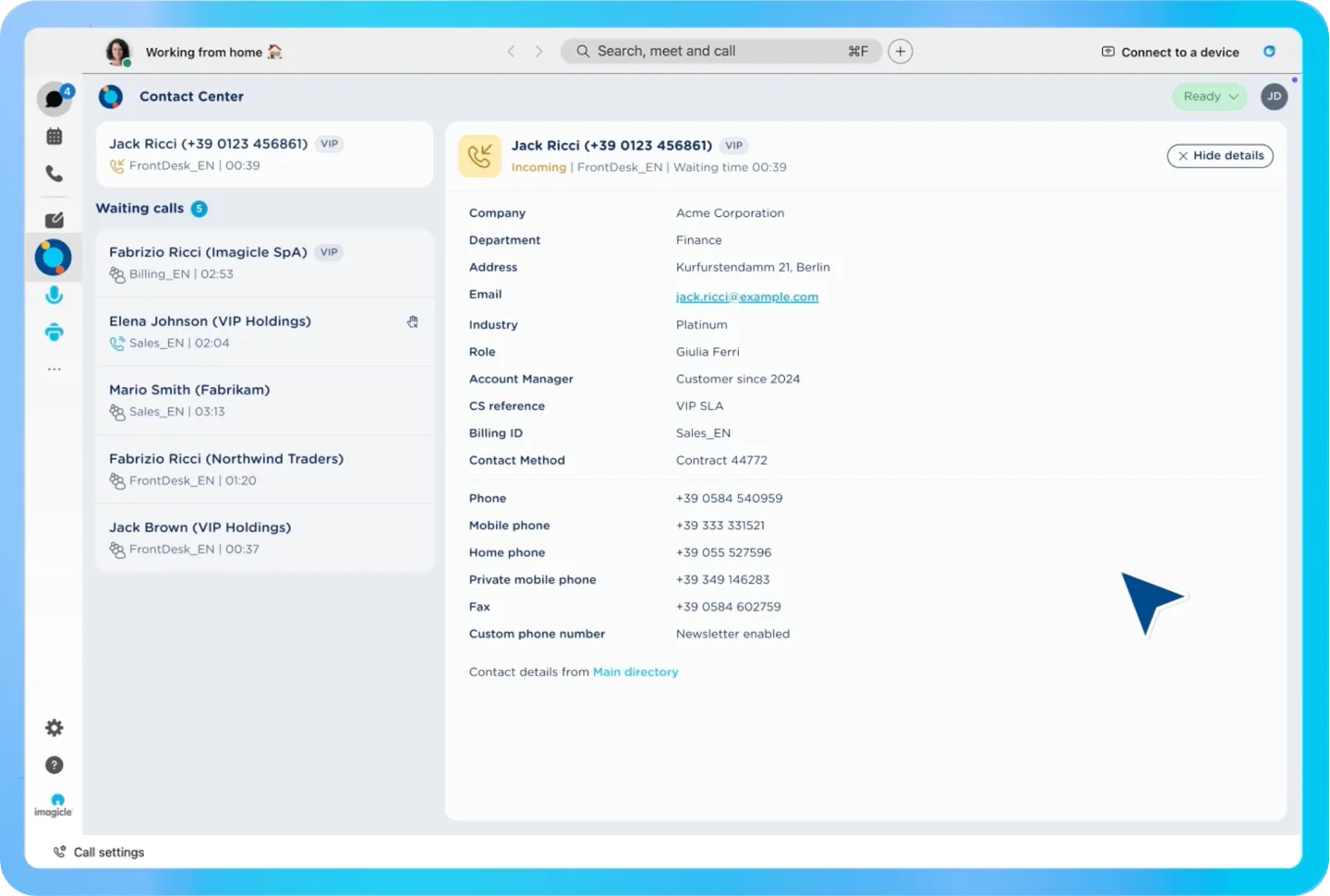
What’s missing is everything that turns a ringing phone into a handled request. You can’t see who’s waiting in the queue. You don’t know who’s calling until you pick up. And the customer’s history sits in the CRM, in another window.
So every call means working in three places at once: the collaboration app, the CRM and a separate tool for the queue. None of the three knows what the other two are doing.
Most organizations deal with this in one of two ways. They leave things as they are, and agents keep juggling windows. Or they roll out a full contact center: a new client, a new login and training on a new interface, for a team that will use a fraction of it.
There’s a middle ground. Core contact center features (queue visibility, caller ID, customer context) can live right inside Webex and Microsoft Teams, in the app your team already uses all day. That’s what Imagicle Contact Center Core is built for.
Here’s what a fragmented call really costs, which teams need core features, what changes once they’re in place, and when it’s time for a full contact center.
What a fragmented call actually costs.
The cost of three separate windows doesn’t show up in a report. It shows up one call at a time.
A call comes in. The agent can’t see the queue from the app they’re working in, so they don’t know how many people are waiting or for how long. A call that should have been picked up gets missed, or lands on the wrong person and gets transferred again.
The next caller is one of your most important accounts. Your systems know it, but nothing tells the agent before they answer. So the account waits in line like everyone else, and the agent has no reason to react differently.
Then the call connects. The agent switches to the CRM, searches for the number, hopes it matches. Meanwhile the customer repeats who they are and why they’re calling, to someone who should already know.
Add it up and the cost is clear: missed calls, strategic accounts treated like anyone else, and time lost on every call before the conversation even starts. So the problem isn’t the calls. It’s the steps between the agent and the customer.
Those steps weigh most on teams where the phone is only part of the job. A dedicated contact center agent has tools built for this. A helpdesk technician or a branch employee usually doesn’t.
Who needs core contact center features.
Any team that handles calls through a queue and needs customer context, without running a contact center. In practice, three kinds of teams.
- Internal support. IT helpdesk, HR, operations desk. Colleagues call with a request, and the team needs to see the queue and know who’s on the line.
- Small customer-facing teams. A bank branch, a medical practice, a retail store, a real estate agency, a shipping office. Few people, real customers, and every caller expects to be recognized.
- Teams with shared call responsibilities. Reception, on-call staff, professional services. Calls are shared across the team and fit in between other tasks.
The calls these teams handle look alike, too:
- Internal support requests.
- Calls that need customer context.
- Call handling shared with other work.
- Triage and first response.
If your team fits here, you don’t need a bigger tool. You need the missing pieces inside the one you already use – and Imagicle provides exactly that.
What changes inside Webex and Microsoft Teams with Imagicle Contact Center Core.
Contact Center Core is the entry profile of Imagicle Contact Center. It’s a light web app that runs inside Webex or Microsoft Teams. No extra client to install, no extra login. Agents stay in the app they already work in, and get the pieces that were missing.
Log in and see the queue. Agents log in to their queues from inside the app and see who’s waiting. Fewer missed calls, fewer transfers to the wrong person.
Control calls from the same window. Answer and transfer directly from Webex or Microsoft Teams. No switching to another tool to move a call.
Know who’s calling, and who matters most. Caller ID shows who’s on the line. VIP prioritization flags your strategic accounts before the call connects, so they don’t wait in line like everyone else.
Get the customer’s context with the call. An automatic contact card and a CRM screen pop-up open the moment the call connects. Company, role and account details are there before the agent says hello. No manual search, and no customer repeating who they are.
The result is fewer windows open and more focus on the person on the line.
Light to deploy, ready to grow.
Contact Center Core integrates natively with the calling platform you already run: Webex, Cisco UCM or Microsoft Teams, even mixed together. Nothing to rip and replace, and no migration project. Rollout takes days, not months.
You also choose where it runs: in the cloud, on premises, or as a hybrid mix, to match your infrastructure and compliance needs.
And it’s a starting point, not a ceiling. Core is one profile of Imagicle Contact Center, so you can add capabilities on the same platform as your needs change.
Not every agent works the same way.
To sum up, for many agents a full contact center would get in the way of their productivity. For others, it’s exactly what they need to bring their work into a single screen, with every feature they use.
| Basic needs | Complex needs | |
|---|---|---|
| Type of job | Multi-role: the phone is one of many things they handle | Handling calls is their only job |
| Call volume | Recurring, but contained | High and continuous |
| Scenarios | One-off questions, solved in a single call | Multi-step processes: escalations, follow-ups, case tracking |
| Teams | Small or distributed, not run as a contact center | Dedicated contact center teams, with structured shifts and queues |
| Key features | Queue visibility, caller ID, customer context | Full call control, real-time analytics, advanced call routing |
| Workspace | Core contact center features inside the collaboration app | A full, standalone contact center console |
In conclusion, Contact Center Core is built for the left column. When a team’s work starts to look like the right one, core features stop being enough, and it’s time for a full contact center.
When you need to scale to advanced features: Imagicle Contact Center, with full capabilities.
Customers start reaching you on WhatsApp, SMS, Telegram and chat, not just by phone. And supervisors need to spot problems while they’re happening, not the next morning.
That’s when the full Imagicle Contact Center makes sense. It adds a layer for each role.
For customers. AI Receptionist answers around the clock and routes callers to the right person or department. IVR and ACD call flows are built with no-code configuration.
For agents. The Advanced Agent Console is a dedicated client with full call control and omnichannel interactions, including real-time chat and complete chat history.
For supervisors. Real-time monitoring of agents and queues, historical reports and dashboards with Advanced Analytics, and AI quality management with transcription, sentiment analysis and call summarization – sitting on top of compliance recording, adhering to GPDR, HIPAA, PCI-DSS, and more.
Because Core is a profile of the same platform, moving up doesn’t mean starting over. You can keep Core for most of the team and give the advanced workspace only to the people who need it. If you’re on Microsoft Teams, here’s how the full setup looks: Turn Microsoft Teams into a Contact Center.
Start where your team already works.
If your team takes calls between everything else, it doesn’t need a new place to work. It needs the queue, the caller and the customer’s context in the place it already uses.
See it working on your own calling platform: Start your free trial or book a demo.