EN
Wed. 20 May
11:00 AM EDT Regístrese
11:00 AM EDT
Regístrese
WEBINAR - Sales Lab
Imagicle Partner Enablement: Selling Imagicle AI Contact Center


 Regístrese
 Stefania Solivardi - 7 ’ read
Cloud based contact center software, contact center software, omnichannel contact center software… We understand the confusion, and we’re here to clear it up; starting with helping you understand what a cloud based contact center software is and whether your business needs it or not.
Customers no longer tolerate long wait times, repeated explanations, or fragmented support experiences. Whether they reach out via phone, email, live chat, or social media, they expect fast, consistent, and personalized responses.
For many businesses, the challenge isn’t just keeping up with these expectations, for example through adopting an AI receptionist. It’s understanding whether their current infrastructure is built to support them. As support and customer service operations grow more complex, traditional on-premise contact center software can start to show its limits.
This is where the idea of a cloud based contact center software becomes relevant. But before treating it as the default next step, it’s worth asking a more grounded question: is moving to the cloud the right choice for your business model, or would a traditional on-premise setup still serve you better?

At a basic level, the difference comes down to where your contact center software lives and how it’s managed.
An on-premise contact center software is hosted internally. Your company owns and maintains the servers, installs the software locally, and relies on internal IT to manage updates, integrations, and scaling. This approach offers control, but it also requires ongoing technical effort and upfront investment.
A cloud based contact center software, on the other hand, is hosted remotely and accessed through the internet. Instead of managing infrastructure yourself, you use a platform provided as a service (SaaS). Your team logs in through a browser and can handle calls, emails, chats, and other channels from a single interface.
A simple way to picture it: it’s like using Google Docs instead of saving files on your computer. You can access everything anytime, anywhere, and collaborate more easily. It’s the difference between owning and maintaining your own servers versus using a service that’s already built, updated, and ready to scale when you need it.
Many businesses don’t immediately question their infrastructure. Systems often work well at the beginning, but as operations grow, limitations start to surface.
Rather than appearing all at once, the limits of an on-premise setup usually emerge through constraints tied to infrastructure and scalability.
As demand grows, handling higher volumes often requires new hardware, longer procurement cycles, or manual capacity planning. What could be a quick adjustment becomes a project that takes weeks or months.
Maintenance also becomes more visible over time. Updates, security patches, and system monitoring depend heavily on internal IT resources, increasing both workload and operational risk.
At the same time, integrating new tools or channels can be slow and complex, especially when systems weren’t designed to evolve quickly. Expanding capabilities often means working around existing architecture rather than building on it.
These aren’t isolated issues, they’re structural limitations. When infrastructure starts to dictate how fast your business can move, it’s usually a sign the model itself is becoming a constraint.
Because the infrastructure is managed externally, your team no longer needs to handle maintenance, updates, or capacity planning. This removes a significant layer of operational complexity and allows you to focus more on performance and customer experience on your omnichannel contact center software.
From a functional perspective, both cloud and on-premise systems can offer features like call routing, analytics, and multi-channel support. The key difference is how easily those features can be adjusted and scaled.
In a cloud environment:
This flexibility becomes particularly valuable when demand fluctuates or when the business is evolving quickly.
For companies that are scaling, the contrast between the two models of omnichannel contact center software becomes more pronounced over time. With an on-premise system, growth often means expanding infrastructure. This can involve purchasing hardware, upgrading systems, and allocating IT resources – all of which take time and planning.
Cloud based platforms remove much of that friction. You can add or remove users as needed, expand into new channels, and adapt workflows without changing the underlying infrastructure.
The cost structure also shifts. Instead of large upfront investments, cloud solutions typically operate on a subscription basis. This makes spending more predictable and aligns costs with actual usage.
Perhaps more importantly, cloud systems make it easier to maintain consistency as you grow your omnichannel contact center software. When all interactions are managed within a single, accessible environment, teams can respond faster and with better context, improving the overall customer experience.
Get in touch – we’ll help you understand what kind of infrastructure best fits your needs.
Despite its advantages, the cloud isn’t always the best option.
Some businesses require a high level of control over data and infrastructure due to regulatory contact center compliance. In these cases, an on-premise solution may still be the safer choice.
There are also situations where legacy systems play a significant role. If your operations rely heavily on deeply integrated, older software, transitioning to the cloud can be complex and may require careful planning.
Finally, cloud solutions depend on reliable internet connectivity. In environments where that isn’t guaranteed, an on-premise system can offer greater stability.
The key is recognizing that the cloud is not universally better, it’s simply better suited to certain conditions.
Before deciding to move to a cloud based contact center software, it helps to step back and look at the bigger picture.
Instead of focusing only on features, consider how your system supports your operations today and how it will support them in the future.
Some useful questions include:
The answers to these questions will often point more clearly to the right model than any feature comparison.
Imagine a growing e-commerce business that initially relies on a basic setup: a shared inbox and a phone line connected to a small, on-premise system.
At first, this works well. But as order volume increases, so does the number of customer inquiries. The team begins to fall behind, and scaling the system requires additional hardware, configuration, and IT involvement.
By moving to a cloud based contact center software, the business can expand its support team quickly, manage all interactions in one place, and adapt workflows without rethinking the entire system. The result isn’t just better efficiency, but a structure that can grow alongside the business.
That said, on-premise setups are not inherently limiting in every context. For example, a company operating in a highly regulated industry such as finance, healthcare, or government may require full control over data, infrastructure, and security policies. In these cases, keeping systems on-premise can simplify compliance, ensure data sovereignty, and provide a level of control that cloud solutions may not easily match.
Similarly, organizations with stable workloads and existing infrastructure investments may find on-premise systems both cost-effective and sufficient for their needs, without the pressure to scale rapidly or frequently adapt their setup.
Imagicle’s Contact Center Software stands out for its ability to combine flexibility, ease of use, and advanced functionality in a single platform. Designed to work natively with environments like Microsoft Teams and Cisco/Webex, it transforms existing calling systems into a fully functional, omnichannel contact center without the need for complex integrations.
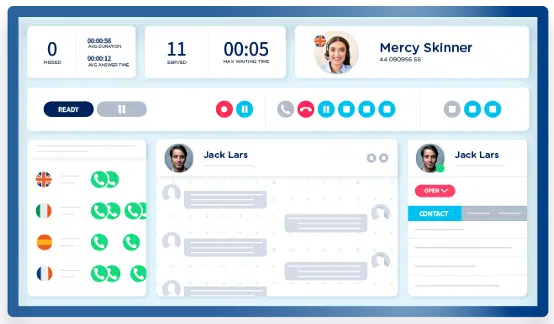
At its core, Imagicle offers a unified workspace where agents can manage calls, chats, and queues from one interface, improving visibility and reducing response times. Built-in AI features such as virtual receptionists, intelligent routing, and AI analytics help automate routine interactions and provide real-time insights for supervisors, enabling better decision-making and service quality control.
What makes the solution particularly relevant is its modular and scalable approach. Businesses can start with essential features and expand over time, adding new channels, automation, or analytics without reworking their infrastructure. Whether deployed in the cloud, on-premise, or in a hybrid model, Imagicle is designed to adapt to different operational needs while maintaining a consistent customer experience.
In practice, this means faster deployment, less dependency on heavy IT involvement, and a smoother transition toward a more modern, omnichannel support model without losing control over how the system is configured and managed.
Do you want to see how it works? Book a free 30′ demo
The decision between cloud and on-premise is not about choosing the most modern option, but about choosing the one that aligns with how your business operates and evolves.
On-premise systems offer control and stability, but can become rigid over time. Cloud based solutions provide flexibility and scalability, but rely on external infrastructure and connectivity.
For businesses facing growth, increasing complexity, or the need for greater agility, the cloud often represents a more sustainable path forward.
The real question isn’t whether you need a better contact center software. It’s whether your current model is built to keep up with what comes next.
The main difference lies in how the system is hosted and managed. On-premise software is installed and maintained on your company’s own servers, requiring internal IT resources. Cloud based solutions are hosted externally and accessed via the internet, with maintenance, updates, and infrastructure handled by the provider.
Not necessarily. On-premise systems usually involve higher upfront costs for hardware and setup, while cloud solutions operate on a subscription model. Over time, cloud software can be more cost-efficient, especially for businesses that need flexibility and scalability.
Yes. One of the main advantages of cloud based systems is accessibility. Teams can log in from anywhere with an internet connection, making it easier to support remote or hybrid work environments without additional infrastructure.
Most cloud providers implement strong security measures, including encryption, regular updates, and compliance with industry standards. However, businesses with strict regulatory requirements may still prefer on-premise solutions for greater control over data and infrastructure.
On-premise setups are often a better fit for organizations with strict compliance requirements, highly sensitive data, or environments where internet reliability is a concern. They can also be suitable for businesses with stable operations and existing infrastructure investments.
It may be time to consider the cloud if your system is difficult to scale, requires frequent IT intervention, or struggles to support new channels and workflows. Growing complexity and the need for greater flexibility are often strong indicators that a cloud model could be a better fit.
 Download
Download
Download